
Fess
Powerful and easily deployable Enterprise Search Server.
Powerful and easily deployable Enterprise Search Server.
# Fess: Enterprise Search Server
[](https://github.com/codelibs/fess/actions/workflows/maven.yml)
[](https://github.com/codelibs/fess/blob/main/LICENSE)

## Overview
Fess is an enterprise search server that you can install and run on any platform with a Java runtime. It is built on [OpenSearch](https://github.com/opensearch-project/OpenSearch), but prior OpenSearch knowledge is not required: Fess is configured through a browser-based administration UI.
A built-in crawler collects documents from [web sites](https://fess.codelibs.org/stable/admin/webconfig-guide.html), [file systems](https://fess.codelibs.org/stable/admin/fileconfig-guide.html), and [data stores](https://fess.codelibs.org/stable/admin/dataconfig-guide.html) such as databases and CSV files. Many file formats are supported, including Microsoft Office, PDF, and ZIP archives.
[Fess Site Search](https://github.com/codelibs/fess-site-search) is a free alternative to Google Site Search that you can embed in your own website. For details, see the [FSS JS Generator documentation](https://fss-generator.codelibs.org/docs/manual).
## Features
- Full-text search with faceting, sorting, and search suggestions
- Crawlers for web sites, file systems, and data stores (databases, cloud storage, and SaaS)
- Support for many document formats, including Microsoft Office, PDF, and archives
- Browser-based administration UI and a REST API
- Role- and permission-based filtering of search results
- Single sign-on with LDAP, OpenID Connect, SAML, SPNEGO, and Microsoft Entra ID
- Multilingual user interface and text analysis (20+ languages)
- Extensible through data store, ingest, script, and theme plugins
## Requirements
- Java 21 or later, for the ZIP, RPM, and DEB packages
- OpenSearch as the search engine backend. The Docker images bundle it; for other installations you set it up separately.
See the [Installation Guide](https://fess.codelibs.org/stable/install/index.html) for supported versions and setup details.
## Getting Started
There are two ways to try Fess: download and install it yourself, or run it with [Docker](https://www.docker.com/products/docker-engine).
### Download and Install/Run
Fess can be downloaded from the [Releases page](https://github.com/codelibs/fess/releases). Downloads are available in three formats: DEB, RPM, and ZIP.
The following commands show how to use the ZIP download:
$ unzip fess-<version>.zip
$ cd fess-<version>
$ ./bin/fess
For more details, see the [Installation Guide](https://fess.codelibs.org/stable/install/index.html).
### Docker
Docker images are published on [ghcr.io](https://github.com/orgs/codelibs/packages). A Docker Compose file is available in the [docker-fess repository](https://github.com/codelibs/docker-fess/tree/main/compose).
### Browser UI
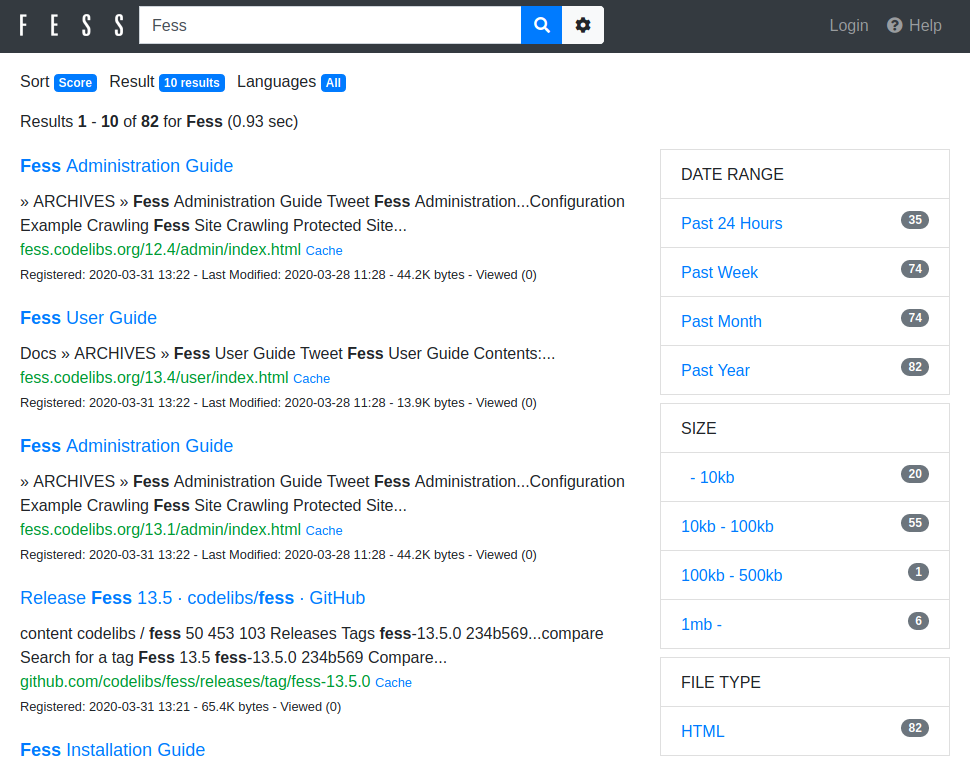
- Search UI: http://localhost:8080/
- Admin UI: http://localhost:8080/admin/ (default username/password is admin/admin)
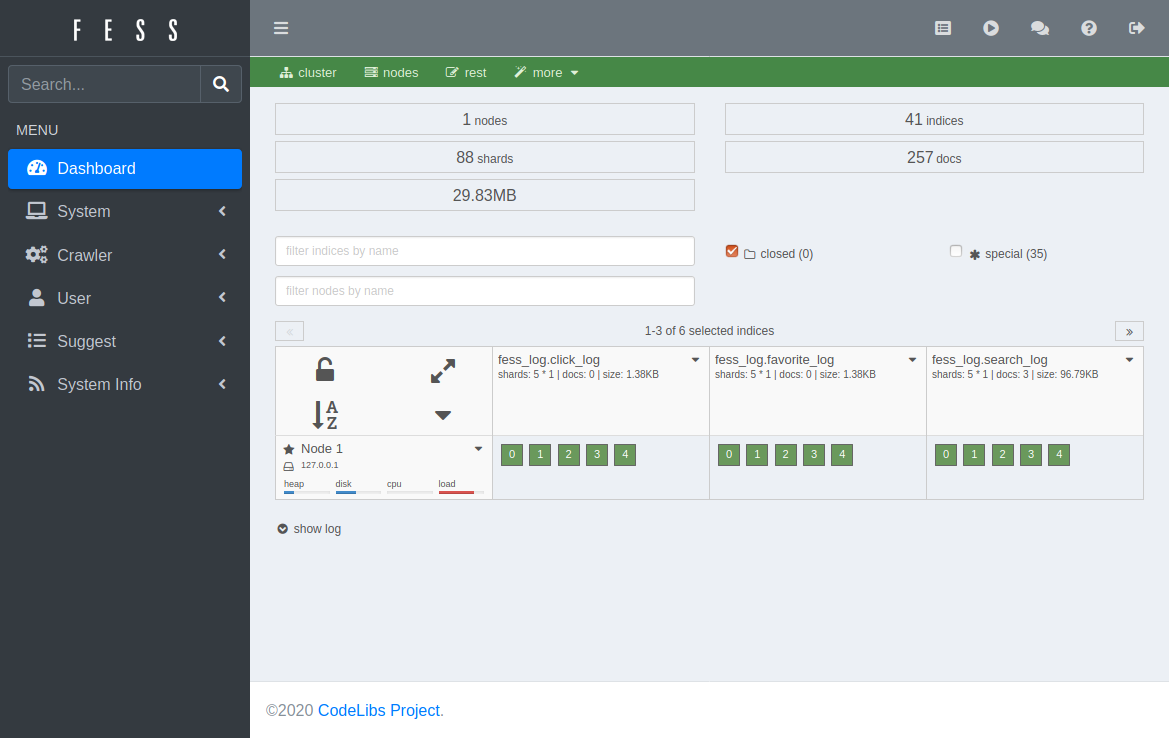
Register crawling targets on the Web, File, or Data Store configuration pages in the Admin UI, then start the crawler from the [Scheduler page](https://fess.codelibs.org/stable/admin/scheduler-guide.html).
## Migration from Another Search Provider
See [MIGRATION.md](MIGRATION.md).
## Data Store
Fess can crawl the following [storage locations and APIs](https://fess.codelibs.org/stable/admin/dataconfig-guide.html):
- [Confluence/Jira](https://github.com/codelibs/fess-ds-atlassian)
- [Box](https://github.com/codelibs/fess-ds-box)
- [CSV](https://github.com/codelibs/fess-ds-csv)
- [Database](https://github.com/codelibs/fess-ds-db)
- [Dropbox](https://github.com/codelibs/fess-ds-dropbox)
- [Elasticsearch](https://github.com/codelibs/fess-ds-elasticsearch)
- [Git](https://github.com/codelibs/fess-ds-git)
- [Gitbucket](https://github.com/codelibs/fess-ds-gitbucket)
- [G Suite](https://github.com/codelibs/fess-ds-gsuite)
- [JSON](https://github.com/codelibs/fess-ds-json)
- [Office 365](https://github.com/codelibs/fess-ds-office365)
- [S3](https://github.com/codelibs/fess-ds-s3)
- [Salesforce](https://github.com/codelibs/fess-ds-salesforce)
- [SharePoint](https://github.com/codelibs/fess-ds-sharepoint)
- [Slack](https://github.com/codelibs/fess-ds-slack)
## Plugins
Fess can be extended with plugins. In addition to the data store connectors above, the following are available.
### Theme
- [fess-themes](https://github.com/codelibs/fess-themes): a collection of static themes, each a self-contained single-page app installed by uploading a ZIP in the admin UI
### Ingest
- [Logger](https://github.com/codelibs/fess-ingest-logger)
- [NDJSON](https://github.com/codelibs/fess-ingest-ndjson)
### Script
- [Groovy](https://github.com/codelibs/fess-script-groovy)
- [OGNL](https://github.com/codelibs/fess-script-ognl)
## Development
### Get the Source Code
1. Clone the repository:
```
$ git clone https://github.com/codelibs/fess.git
```
2. Import it as a [Maven](https://maven.apache.org/) project in your IDE.
Building Fess requires Java 21 or later and Maven.
### Set Up OpenSearch Plugins
Run `antrun:run` to download plugins into the plugins directory:
$ mvn antrun:run
### Run Fess
Run or debug `org.codelibs.fess.FessBoot` in your IDE, then open http://localhost:8080/.
### Build a Package
Run the `package` goal to create the release file in `target/releases`:
$ mvn package
$ mvn rpm:rpm # .rpm package
$ mvn jdeb:jdeb # .deb package
### Generate Source Code
$ mvn dbflute:download # one-time setup
$ mvn dbflute:freegen
$ mvn license:format
### Integration Tests
Integration tests require a running Fess server with OpenSearch.
1. Build Fess:
$ mvn antrun:run # download OpenSearch plugins, if not done already
$ mvn package
2. Start the Fess server:
$ unzip target/releases/fess-*.zip
$ ./fess-*/bin/fess &
Wait for Fess to become ready (this may take up to 60 seconds). It returns a JSON response when ready:
$ curl -s "http://localhost:8080/api/v1/health"
3. Clone the test data (required for `SearchApiTests`):
$ git clone https://github.com/codelibs/fess-testdata.git /tmp/fess-testdata
4. Run the tests:
$ mvn test -P integrationTests -Dtest.fess.url="http://localhost:8080" -Dtest.search_engine.url="http://localhost:9201"
To run a single test case:
$ mvn test -P integrationTests -Dtest.fess.url="http://localhost:8080" -Dtest.search_engine.url="http://localhost:9201" -Dtest=SearchApiTests
## Contributing
Contributions are welcome. If you find a bug or have a feature request, please open an [issue](https://github.com/codelibs/fess/issues). For questions and discussion, use the [forum](https://discuss.codelibs.org/c/FessEN/). Pull requests for fixes and improvements are appreciated; for larger changes, discussing the approach first is recommended.
Before committing, format the code and license headers:
$ mvn formatter:format
$ mvn license:format
### Adding a Language
Fess is internationalized. To add labels and messages for a language, translate the property files below and rename them with your language code (`fess_*_[lang].properties`):
- [fess_label_en.properties](https://github.com/codelibs/fess/blob/main/src/main/resources/fess_label_en.properties)
- [fess_message_en.properties](https://github.com/codelibs/fess/blob/main/src/main/resources/fess_message_en.properties)
For search and index analysis, if [doc.json](https://github.com/codelibs/fess/blob/main/src/main/resources/fess_indices/fess/doc.json) contains `lang_[lang]` for your language, adjust the analyzer accordingly. See the [OpenSearch documentation](https://opensearch.org/docs/latest/analyzers/search-analyzers/) on analyzers for details. Pull requests for new languages are welcome.
## Community and Support
- Website and documentation: [fess.codelibs.org](https://fess.codelibs.org/)
- Questions and discussion: [discuss.codelibs.org](https://discuss.codelibs.org/c/FessEN/)
- Bug reports and feature requests: [GitHub Issues](https://github.com/codelibs/fess/issues)
## Translations
This README is available in other languages:
- [日本語 (Japanese)](docs/ja/README.md)
- [简体中文 (Simplified Chinese)](docs/zh-CN/README.md)
- [Español (Spanish)](docs/es/README.md)
- [Português (Brazilian Portuguese)](docs/pt-BR/README.md)
- [Français (French)](docs/fr/README.md)
- [Deutsch (German)](docs/de/README.md)
- [한국어 (Korean)](docs/ko/README.md)
## Powered By
- [Lasta Di](https://github.com/lastaflute/lasta-di): DI container
- [LastaFlute](https://github.com/lastaflute/lastaflute): web framework
- [Lasta Job](https://github.com/lastaflute/lasta-job): job scheduler
- [Fess Crawler](https://github.com/codelibs/fess-crawler): web crawler
- [OpenSearch](https://opensearch.org/): search engine
## License
Fess is distributed under the [Apache License 2.0](LICENSE).
Enterprise search platform featuring full-text search, hit highlighting, faceted search, real-time indexing, dynamic clustering, and rich document (e.g., Word, PDF) handling.
Distributed and RESTful search engine.
Cloud-native neural search framework for any kind of data.
Search engine that requires minimal resources (alternative to Elasticsearch).