
OpenTrashmail
Complete trashmail solution that exposes an SMTP server and has a web interface to manage received emails. Works with multiple and wildcard domains and is fully file based (no database needed). Includes RSS feeds and JSON API.
<p align="center"> <a href="" rel="noopener"> <img height=200px src="https://raw.githubusercontent.com/HaschekSolutions/opentrashmail/master/web/imgs/logo-200.png" alt="Open Trashmail"></a> </p> <h1 align="center">Open Trashmail</h1> <div align="center">     [](https://hub.docker.com/r/hascheksolutions/opentrashmail) [](https://github.com/HaschekSolutions/opentrashmail/actions) [](https://github.com/HaschekSolutions/opentrashmail/blob/master/LICENSE) [](https://hits.seeyoufarm.com) [](https://github.com/HaschekSolutions/opentrashmail) #### Selfhosted `trashmail` solution - Receive Emails via `Web UI`, `JSON API`, `RSS feed` and `Custom Webhooks` </div> 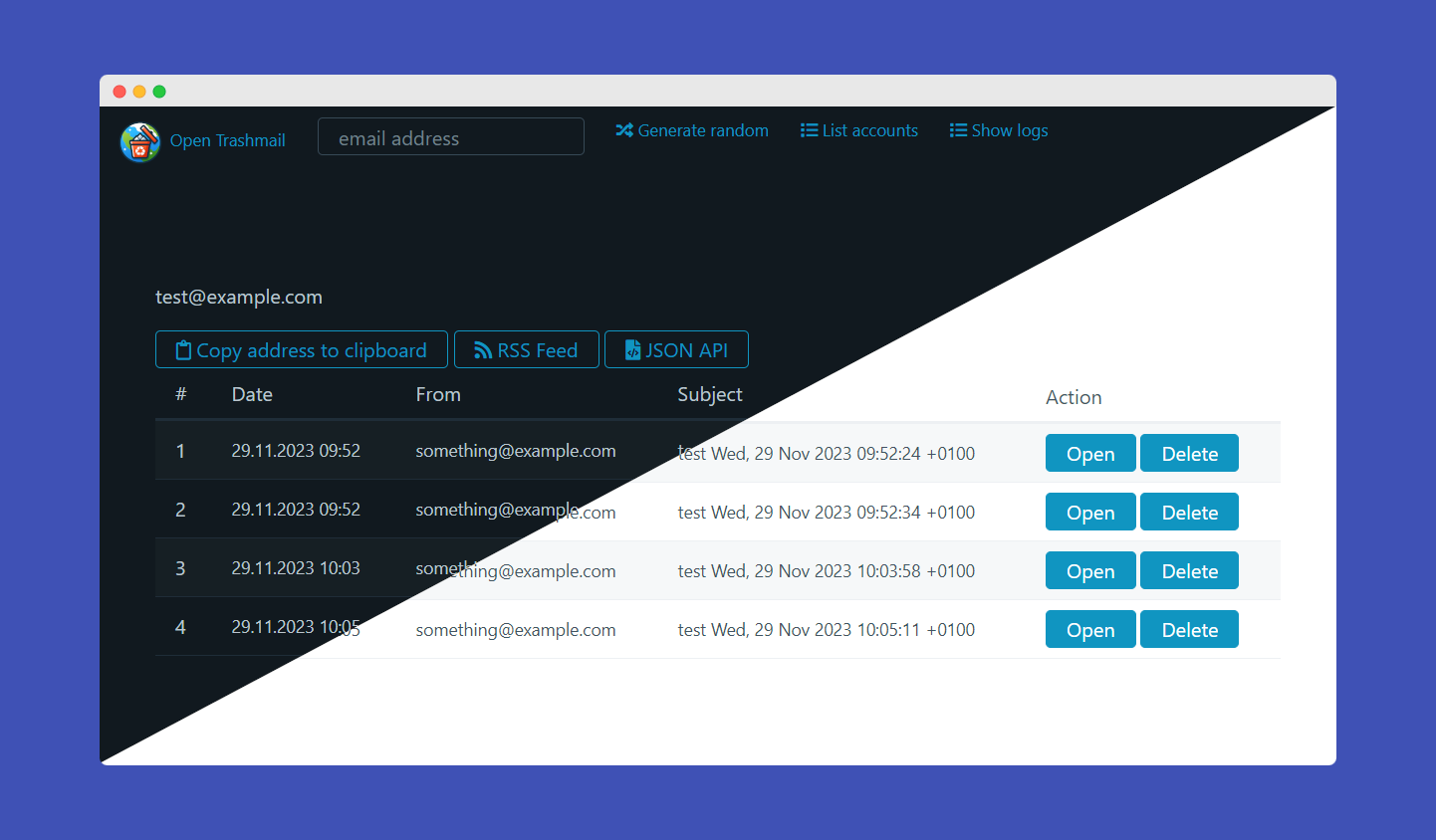 # [Changelog](/CHANGELOG.md) # Features - Python-powered mail server that works out of the box for any domain you throw at it - `RSS feed` for every email address - `JSON API` for integrating it in your own projects. Can be used to automate 2fa emails - `Webhooks` with per-email configuration and customizable JSON payloads - Handles attachments - Supports `Plaintext`, `STARTTLS` and `TLS on connect` - Web interface - Automatic dark/light mode switcher - Download attachments - Delete emails - Generate random email addresses - View server logs and list all accounts as admin - 100% file based, no database needed - Can be used as Email Honeypot or to programmatically solve 2fa emails - No need to pre-create email addresses. Any valid email address can be sent to # General API calls and functions | Endpoint | Explanation | Example output | |----------------------------|-------------------------------------------------------------------------------------------------------------------------------------------------------------------------------------------------------|----------------------------------| | /rss/`[email-address]` | Renders RSS XML for rss clients to render emails | [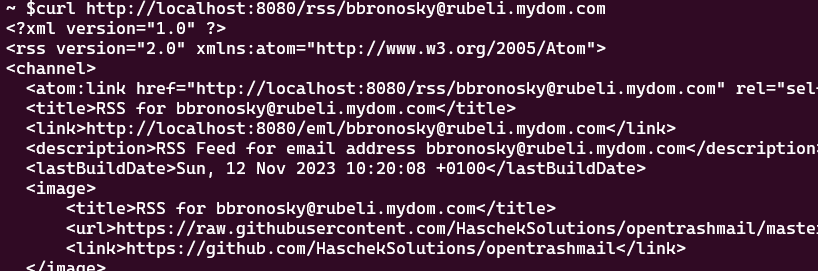](https://pictshare.net/ysu5qp.png) | | /api/raw/`[email-address]/[id]` | Returns the raw email of the address. Warning: Output can be as large as the email itself so might be up to 20mb for mails with large attachments | [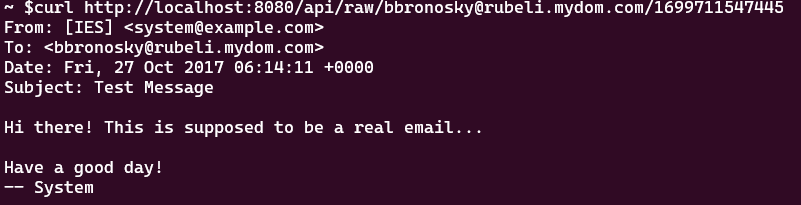](https://pictshare.net/pkb49p.png) | | /api/attachment`[email-address]/[attachment-id]` | Returns the attachment with the correct mime type as header | | | /api/delete/`[email-address]/[id]` | Deletes a specific email message and their attachments | | | /api/deleteaccount/`[email-address]`| Deletes all messages and attachments of this email account | | | /api/webhook/get/`[email-address]` | Get webhook configuration for an email address | | | /api/webhook/save/`[email-address]` | Save webhook configuration for an email address | | | /api/webhook/delete/`[email-address]` | Delete webhook configuration for an email address | | # JSON API | Endpoint | Explanation | Example output | |----------------------------|-------------------------------------------------------------------------------------------------------------------------------------------------------------------------------------------------------|----------------------------------| | /json/`[email-address]` | Returns an array of received emails with links to the attachments and the parsed text based body of the email. If `ADMIN` email is entered, will return all emails of all accounts | [](https://pictshare.net/sflw6t.png) | | /json/`[email-address]/[id]` | To see all the data of a received email, take the ID from the previous call and poll this to get the raw and HTML body of the email. Can be huge since the body can contain all attachments in base64 | [](https://pictshare.net/eltku4.png) | | /json/listaccounts | If `SHOW_ACCOUNT_LIST` is set to true in the config.ini, this endpoint will return an array of all email addresses which have received at least one email | [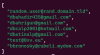](https://pictshare.net/u6agji.png) | # Configuration Just edit the `config.ini` You can use the following settings - `URL` -> The url under which the GUI will be hosted. No tailing slash! example: https://trashmail.mydomain.eu. Can contain a path if the UI is hosted in a sub folder behind a reverse proxy (eg. `https://mydomain.eu/trashmail`) - `DOMAINS` -> Comma separated list of domains this mail server will be receiving emails on. It's just so the web interface can generate random addresses - `MAILPORT`-> The port the Python-powered SMTP server will listen on. `Default: 25` - `ADMIN` -> An email address (doesn't have to exist, just has to be valid) that will list all emails of all addresses the server has received. Kind of a catch-all - `DATEFORMAT` -> How should timestamps be shown on the web interface ([moment.js syntax](https://momentjs.com/docs/#/displaying/)) - `PASSWORD` -> If configured, site and API can't be used without providing it via form, POST/GET variable `password` or http header `PWD` (eg: `curl -H "PWD: 123456" http://localhost:8080/json...`) - `ALLOWED_IPS` -> Comma separated list of IPv4 or IPv6 CIDR addresses that are allowed to use the web UI or API - `TRUSTED_PROXIES` -> Comma separated list of CIDR ranges of reverse proxies whose `X-Forwarded-For`/`CF-Connecting-IP` headers are trusted for `ALLOWED_IPS`. Proxies in private networks are always trusted. Only needed if a public proxy (eg. Cloudflare) connects directly to OpenTrashmail - `SMTP_HOSTNAME` -> Hostname the mail server uses in its greeting and EHLO response. Should be the name your MX record points to (eg. `mail.example.com`). Defaults to the first domain in `DOMAINS` - `ATTACHMENTS_MAX_SIZE` -> Max size for each individual attachment of an email in Bytes - `MAILPORT_TLS` -> If set to something higher than 0, this port will be used for TLSC (TLS on Connect). Which means plaintext auth will not be possible. Usually set to `465`. Needs `TLS_CERTIFICATE` and `TLS_PRIVATE_KEY` to work - `TLS_CERTIFICATE` -> Path to the certificate (chain). Can be relative to the /python directory or absolute - `TLS_PRIVATE_KEY` -> Path to the private key of the certificate. Can be relative to the /python directory or absolute - `WEBHOOK_URL` -> Global webhook URL. If set, will send a POST request to this URL with the JSON data of the email as body for all emails (unless overridden by per-email webhook) - `ADMIN_ENABLED` -> Enables the admin menu. Default `false` - `ADMIN_PASSWORD` -> If set, needs this password to access the admin menu - `NOTICE` -> Optional text shown on top of every page, eg. to tell your users that emails are deleted after 30 days. Use `\n` for line breaks ## Docker env vars In Docker you can use the following environment variables: | ENV var | What it does | Example values | | --------|--------------|----------| | URL | The URL of the web interface. Used by the API and RSS feed | http://localhost:8080 | | DISCARD_UNKNOWN | If `true` the mail server rejects recipients on domains that are not in `DOMAINS`. Strongly recommended on public servers, with `false` the server accepts mail for any domain which looks like an open relay to blacklist operators | true, false | | DOMAINS | The whitelisted Domains the server will listen for. If DISCARD_UNKNOWN is set to false, this will only be used to generate random emails in the webinterface | | SHOW_ACCOUNT_LIST | If set to `true`, all accounts that have previously received emails can be listed via API or webinterface | true,false | | ADMIN | If set to a valid email address and this address is entered in the API or webinterface, will show all emails of all accounts. Kind-of catch-all | [email protected] | DATEFORMAT | Will format the received date in the web interface based on [moment.js](https://momentjs.com/) syntax | "MMMM Do YYYY, h:mm:ss a" | | SKIP_FILEPERMISSIONS | If set to `true`, won't fix file permissions for the code data folder in the container. Useful for local dev. Default `false` | true,false | | PUID / PGID | Run the web server and mail server as this user/group id instead of 100/101. Use the owner of your mounted `data` and `logs` folders, eg. for network shares | `1000` / `100` | | NOTICE | Text shown on top of every page. `\n` for line breaks | `Emails are deleted after 30 days` | | PASSWORD | If configured, site and API can't be used without providing it via form, POST/GET variable `password` or http header `PWD` | yousrstrongpassword | | ALLOWED_IPS | Comma separated list of IPv4 or IPv6 CIDR addresses that are allowed to use the web UI or API | `192.168.5.0/24,2a02:ab:cd:ef::/60,172.16.0.0/16` | | TRUSTED_PROXIES | CIDR ranges of public reverse proxies whose client IP headers are trusted for `ALLOWED_IPS` (proxies in private networks are always trusted) | `173.245.48.0/20,103.21.244.0/22` | | SMTP_HOSTNAME | Hostname used in the SMTP greeting and EHLO response. Set it to the host your MX record points to. Defaults to the first domain in `DOMAINS` | `mail.example.com` | | ATTACHMENTS_MAX_SIZE | Max size for each individual attachment of an email in Bytes | `2000000` = 2MB | | MAILPORT_TLS | If set to something higher than 0, this port will be used for TLSC (TLS on Connect). Which means plaintext auth will not be possible. Usually set to `465`. Needs `TLS_CERTIFICATE` and `TLS_PRIVATE_KEY` to work | `465` | | TLS_CERTIFICATE | Path to the certificate (chain). Can be relative to the /python directory or absolute | `/certs/cert.pem` or `cert.pem` if it's inside the python directory | | TLS_PRIVATE_KEY | Path to the private key of the certificate. Can be relative to the /python directory or absolute | `/certs/privkey.pem` or `key.pem` if it's inside the python directory | | WEBHOOK_URL | If set, will send a POST request to this URL with the JSON data of the email as body. Can be used to integrate OpenTrashmail in your own projects | `https://example.com/webhook` | | ADMIN_ENABLED | Enables the admin menu. Default `false` | `false` / `true` | | ADMIN_PASSWORD | If set, needs this password to access the admin menu | `123456` | ## Hosting the web UI in a sub folder Set `URL` to the full address including the path (eg. `https://example.com/trashmail`). All links, API calls and inline images will use that path. Your reverse proxy should strip the path before passing requests to OpenTrashmail, eg. for nginx: ```nginx location /trashmail/ { proxy_pass http://opentrashmail:80/; } ``` ## Custom words for random addresses The "Generate random" button builds addresses from the word lists in [wordlists/adjectives.txt](wordlists/adjectives.txt) and [wordlists/nouns.txt](wordlists/nouns.txt) (one word per line, only `a-z`, `0-9` and `-` are used). To use your own words in Docker, mount your files over them: ```bash -v /path/to/nouns.txt:/var/www/opentrashmail/wordlists/nouns.txt:ro ``` ## TLS Since v1.3.0 TLS and STARTTLS are supported by OpenTrashmail. ### What you should know Be aware there are two ways to use TLS with email 1. STARTTLS 2. TLS on Connect (TLSC) **STARTTLS** does not require a specific port as it starts out as plaintext and then upgrades to TLS if the server advertises the "STARTTLS" command (which OpenTrashmail does automatically if the Certificate and key settings are configured). Since it's run on the default `MAILPORT` you don't need to open other ports for it to work. **TLS on connect** is wrapping TLS around the exposed ports so it's not possible to talk to it in plaintext and therefore it needs a different port to work. Usually port 465 is used for this. ### About the certificates For TLS to work you first need a certificate that corresponds with the hostname of the SMTP server. This can be done using Lets'encrypt and even works with wildcard certificates. For testing environments you can create a certificate by running the following command from inside the python folder: ```bash openssl req -x509 -newkey rsa:4096 -keyout key.pem -out cert.pem -days 365 -nodes -subj '/CN=localhost' ``` You then need to set the settings for `MAILPORT_TLS` (not needed if you only want to support STARTTLS), `TLS_CERTIFICATE` and `TLS_PRIVATE_KEY`. ### Testing TLS The [/docs/Dev.md](/docs/Dev.md) file contains a few hints on how to debug and test TLS and TLSC connections. It uses the tool `swaks` which should be avaialable in every package manager. # Roadmap - [x] Mail server - [x] Storing received mails in JSON - [x] Storing file attachments - [x] Docker files and configs - [x] Web interface - [x] Choose email - [x] Get random email address - [x] Download attachments safely - [x] Display Text/HTML - [x] API so all features from the site can also be automated and integrated - [x] Automatically check for new emails while on site - [x] Admin overview for all available email addresses - [x] Option to show raw email - [x] Delete messages - [x] Make better theme - [x] Secure HTML, so no malicious things can be loaded - [x] Display embedded images inline using Content-ID - [x] Configurable settings - [x] Choose domains for random generation - [x] Choose if out-of-scope emails are discarded - [x] Automated cleanup of old mails - [x] Optionally secure whole site with a password - [x] Optionally allow site to be seen only from specific IP Range - [x] Honeypot mode where all emails are also saved for a catchall account (implemented with the ADMIN setting) # Quick start ## Set the MX Records In your DNS panel create a MX record for your domain pointing to the IP of the server hosting OpenTrashmail. The following example will allow you to send emails to example.com ```zonefile mail.example.com. IN A 93.184.216.34 example.com. 14400 IN MX 10 mail.example.com. ``` This advanced example will allow you to use a wildcard domain: ```zonefile mail.example.com. IN A 93.184.216.34 *.example.com. 14400 IN MX 10 mail.example.com. ``` This in combination with the configuration option "DOMAINS" (eg docker parameter `-e DOMAINS="*.example.com"`) will allow you to use any address with any subdomain of example.com (eg [email protected], [email protected], etc..) ## Running in docker (preferred) Simple start with no persistence ```bash docker run -it -p 25:25 -p 80:80 -e URL="https://localhost:80" hascheksolutions/opentrashmail:1 ``` Saving data directory on host machine ```bash docker run -p 80:80 -p 25:25 -e URL="https://localhost:80" -v /path/on/host/where/to/save/data:/var/www/opentrashmail/data hascheksolutions/opentrashmail:1 ``` Complete example with running as daemon, persistence, a domain for auto-generation of emails, acceptng only emails for configured domains, cleanup for mails older than 90 days and auto restart ```bash docker run -d --restart=unless-stopped --name opentrashmail -e "DOMAINS=mydomain.eu" -e "SMTP_HOSTNAME=mail.mydomain.eu" -e "DATEFORMAT='D.M.YYYY HH:mm'" -e "DISCARD_UNKNOWN=true" -e "DELETE_OLDER_THAN_DAYS=90" -p 80:80 -p 25:25 -v /path/on/host/where/to/save/data:/var/www/opentrashmail/data hascheksolutions/opentrashmail:1 ``` # How it works The heart of Open Trashmail is a **Python-powered SMTP server** that listens on incoming emails and stores them as JSON files. Every address on your domains works without creating it first, the server will just **catch everything** it receives. You only have to **expose port 25 to the web** and set an **MX record** of your domain pointing to the IP address of your machine. ## Keeping your domain off disposable email lists Many websites refuse addresses from known trashmail domains. These lists are mostly built by crawling public trashmail sites and by probing mail servers. Out of the box OpenTrashmail: - Greets like a regular mail server (`220 mail.example.com ESMTP`) instead of announcing the software it runs on - Rejects recipients on foreign domains during the SMTP dialog (with `DISCARD_UNKNOWN=true`) so it doesn't look like an open relay - Answers temporary errors with `451` so senders retry instead of bouncing, and never leaks internal error messages - Tells search engines not to index the web UI, API and RSS feeds (`robots.txt`, `X-Robots-Tag` header and meta tags) - Sends `Referrer-Policy: no-referrer` so websites don't see your trashmail URL when you click a link in an email - Hides the nginx and PHP versions What you should do yourself: - **Host the web interface on a different domain than the ones you receive mail on**, so visiting your mail domain doesn't lead to a trashmail site. Optionally protect it with `PASSWORD` or `ALLOWED_IPS` - Set `SMTP_HOSTNAME` to the name your MX record points to and set a matching reverse DNS (PTR) record for your server's IP - Configure `TLS_CERTIFICATE` and `TLS_PRIVATE_KEY` so senders can use STARTTLS. A mail server without TLS looks unusual these days - Don't share addresses from your domain publicly (e.g. in forums), and use a domain that's not used by many people # Webhook Configuration OpenTrashmail supports both global and per-email webhooks for maximum flexibility: ## Quick Start 1. **Via Web UI**: Click "Configure Webhook" on any email address page 2. **Via API**: `POST /api/webhook/save/[email protected]` with your configuration ## Features ### Per-Email Webhooks - Custom endpoint URL for each email address - Customizable JSON payloads with template placeholders - Automatic retry with exponential backoff (max 10 attempts) - HMAC-SHA256 signature for security - Simple web interface configuration ### Payload Template Placeholders | Placeholder | Description | Example | |------------|-------------|---------| | `{{to}}` | Recipient email | [email protected] | | `{{from}}` | Sender email | [email protected] | | `{{subject}}` | Email subject | Hello World | | `{{body}}` | Plain text body | Email content... | | `{{htmlbody}}` | HTML body | `<p>Email content...</p>` | | `{{sender_ip}}` | Sender's IP | 192.168.1.100 | | `{{attachments}}` | Attachment array | `[{"filename":"doc.pdf","size":1024}]` | ### Example Configuration ``` { "email": "{{to}}", "from": "{{from}}", "subject": "{{subject}}", "body": "{{body}}", "attachments": {{attachments}} } ``` **Note**: `{{attachments}}` outputs a JSON array - don't wrap it in quotes. ## API Reference | Endpoint | Method | Description | |----------|--------|-------------| | `/api/webhook/get/[email]` | GET | Get webhook configuration | | `/api/webhook/save/[email]` | POST | Save webhook configuration | | `/api/webhook/delete/[email]` | DELETE | Delete webhook configuration | ### Save Webhook Example ```bash curl -X POST http://localhost:8080/api/webhook/save/[email protected] \ -d "enabled=true" \ -d "webhook_url=https://myapi.com/webhook" \ -d 'payload_template={"email":"{{to}}","subject":"{{subject}}"}' \ -d "max_attempts=5" \ -d "secret_key=your-secret-key" ``` ## Security: Verifying Webhook Signatures When a secret key is configured, OpenTrashmail includes an `X-Webhook-Signature` header with each request containing the HMAC-SHA256 signature of the request body. ### Verification Examples **PHP:** ```php $payload = file_get_contents('php://input'); $signature = $_SERVER['HTTP_X_WEBHOOK_SIGNATURE'] ?? ''; $expected = hash_hmac('sha256', $payload, 'your-secret-key'); if (!hash_equals($expected, $signature)) { http_response_code(401); exit('Invalid signature'); } ``` **Python:** ```python import hmac import hashlib def verify_webhook(request): payload = request.body signature = request.headers.get('X-Webhook-Signature', '') expected = hmac.new( b'your-secret-key', payload, hashlib.sha256 ).hexdigest() if not hmac.compare_digest(expected, signature): return HttpResponse('Invalid signature', status=401) ``` **Node.js:** ```javascript const crypto = require('crypto'); function verifyWebhook(req, res) { const signature = req.headers['x-webhook-signature']; const expected = crypto .createHmac('sha256', 'your-secret-key') .update(req.rawBody) .digest('hex'); if (signature !== expected) { return res.status(401).send('Invalid signature'); } } ``` ## Testing Use the included test script for quick verification: ```bash # Simple test python3 tools/test_webhook.py [email protected] --send-email # With signature verification python3 tools/test_webhook.py [email protected] --secret "your-secret-key" --send-email ``` ## Limitations & Security - Webhook URLs cannot point to localhost or private IP ranges (SSRF protection) - Maximum 10 retry attempts to prevent resource exhaustion - Payload templates must be valid JSON - All placeholders are properly escaped to prevent JSON injection
Knowledge-based community software. You can use it to quickly build your Q&A community for product technical support, customer support, user communication, and more.
A better commenting experience from Vox Media.
Federated, end-to-end encrypted messaging service for the web, iOS, and Android, supporting text, photos, video, and WebRTC video and audio calls.