
SwingMusic
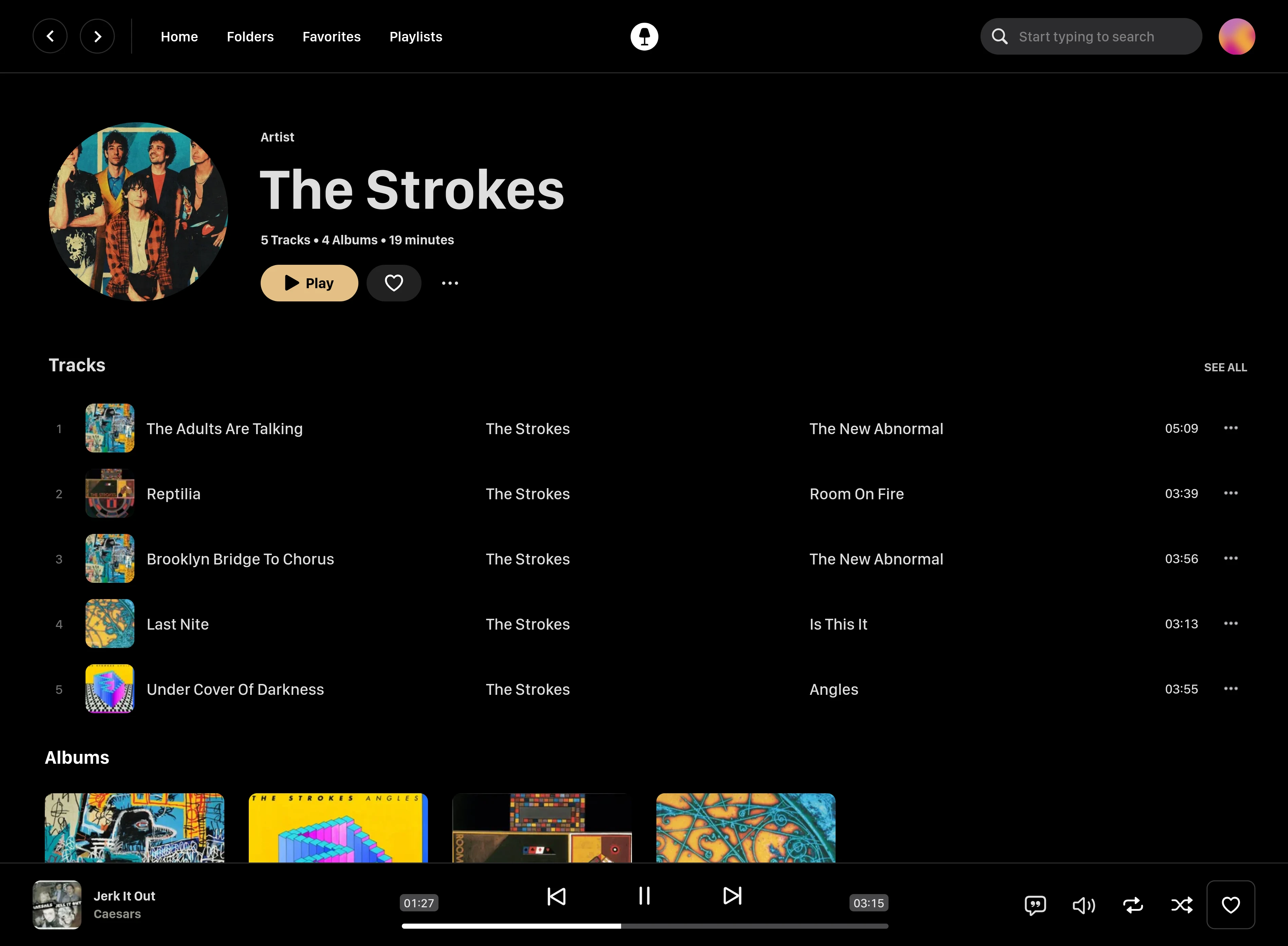
Swing Music is a beautiful, self-hosted music player and streaming server for your local audio files. Like a cooler Spotify ... but bring your own music.
Swing Music is a beautiful, self-hosted music player and streaming server for your local audio files. Like a cooler Spotify ... but bring your own music.
<div align="center" style="display: flex; justify-content: center; align-items: center;">
<img class="lo" src='https://github.com/swingmx/swingmusic/raw/master/.github/images/logo-fill.light.svg' style="height: 4rem">
</div>
<div align="center" style="font-size: 2rem"><b>Swing Music</b></div>
<div align="center">
<img src="https://img.shields.io/github/v/release/swingmx/swingmusic" alt="Latest GitHub Release" />
</div>
**<div align="center" style="padding-top: 1.25rem">[Download](https://swingmx.com/downloads) • [Get Android Client](https://github.com/swingmx/android) • <a href="https://github.com/sponsors/swingmx" target="_blank">Sponsor Us ❤️</a> • [Docs](https://swingmx.com/guide/introduction.html) • [Screenshots](https://swingmx.com) • [r/SwingMusicApp](https://www.reddit.com/r/SwingMusicApp)</div>**
##
[](https://raw.githubusercontent.com/swing-opensource/swingmusic/master/.github/images/artist.webp)
##
Swing Music is a blazingly fast and beautiful, self-hosted music streaming server. Like a cooler Spotify ... but bring your own music.
## Features
- **Daily Mixes** - curated everyday based on your listening activity
- **Metadata normalization** - a clean and consistent library
- **Album versioning** - normalized albums and association with version labels (eg. Deluxe, Remaster, etc)
- **Related artist and albums**
- **Folder view** - Browse your music library by folders
- **Beautiful browser based UI**
- **Silence detection** - Combine cross-fade with silence detection to create a seamless listening experience
- **Collections** - Group albums and artists based on your preferences
- **Statistics** - Get insights into your listening activity
- **Last.fm scrobbling**
- **Multi-user support**
- **Cross-platform** - Windows, Linux, MacOS (coming soon), arm64, x86
### Installation
On Linux or MacOS run the command below to install Swing Music:
```sh
curl -fsSL https://setup.swingmx.com | bash
```
To run Swing Music on Windows, download the portable build from the [downloads page](https://swingmx.com/downloads.html) and run it.
The app should start at <http://localhost:1970> by default. Open the URL in your browser to configure and use Swing Music.
> [!TIP]
> To stream your music from your Android device, download the [Android mobile client](https://github.com/swingmx/android).
#### Using Docker Compose
Here's a sample Docker compose file:
```yaml
services:
swingmusic:
image: ghcr.io/swingmx/swingmusic:latest
container_name: swingmusic
ports:
- "1970:1970"
volumes:
- /path/to/music:/music
- /path/to/config:/config
environment:
- SWINGMUSIC_PORT=1970
- SWINGMUSIC_DEVICE_NAME=Host name here
restart: unless-stopped
```
The `SWINGMUSIC_DEVICE_NAME` sets the name this server reports to connected clients. To use a different port, change both `SWINGMUSIC_PORT` and the `ports` mapping to match (e.g. `2001:2001` with `SWINGMUSIC_PORT=2001`).
### Using Docker CLI
```sh
docker pull ghcr.io/swingmx/swingmusic:latest
```
Then run:
```sh
docker run --name swingmusic -p 1970:1970 -e SWINGMUSIC_PORT=1970 -e SWINGMUSIC_DEVICE_NAME="Host Name Here" -v /path/to/music:/music -v /path/to/config:/config --restart unless-stopped ghcr.io/swingmx/swingmusic:latest
```
Replace the following with appropriate values:
1. `/path/to/music` - Your music directory on the host
2. `/path/to/config` - Path to create Swing Music configs on the host
3. `Host Name Here` - Your host device name
You can change the Swing Music port by updating both the `-p` mapping and `SWINGMUSIC_PORT` to the same value (e.g. `-p 2001:2001 -e SWINGMUSIC_PORT=2001`).
### Options
Options flags can be passed when starting the app in the terminal to tweak runtime settings or perform tasks. You can use the `-h` flag to see all supported options.
> [!TIP]
> You can read more about options in [the docs](https://swingmx.com/guide/introduction.html#options).
### Contributing and Development
Swing Music is looking for contributors. If you're interested, please join us at the [Swing Music Community](https://t.me/+9n61PFcgKhozZDE0) group on Telegram. For more information, take a look at https://github.com/swing-opensource/swingmusic/issues/186.
[**CONTRIBUTING GUIDELINES**](.github/contributing.md).
### License
This software is provided to you with terms stated in the [AGPLv3 License](https://github.com/swingmx/swingmusic/blob/master/LICENSE) or any later version. Read the full text in the `LICENSE` file located at the root of this repository.
### Contributors
Shout out to the following code contributors who have helped maintain and improve Swing Music:
<div align="left">
<table>
<tr>
<td align="center">
<a href="https://github.com/cwilvx">
<img src="https://github.com/cwilvx.png" width="80px;"/>
<br />
<sub><b>@cwilvx</b></sub>
</a>
</td>
<td align="center">
<a href="https://github.com/Ericgacoki">
<img src="https://github.com/Ericgacoki.png" width="80px;" alt=""/>
<br />
<sub><b>@Ericgacoki</b></sub>
</a>
</td>
<td align="center">
<a href="https://github.com/Simonh2o">
<img src="https://github.com/Simonh2o.png" width="80px;"/>
<br />
<sub><b>@Simonh2o</b></sub>
</a>
</td>
<td align="center">
<a href="https://github.com/tcsenpai">
<img src="https://github.com/tcsenpai.png" width="80px;"/>
<br />
<sub><b>@tcsenpai</b></sub>
</a>
</td>
<td align="center">
<a href="https://github.com/jensgrunzer1">
<img src="https://github.com/jensgrunzer1.png" width="80px;"/>
<br />
<sub><b>@jensgrunzer1</b></sub>
</a>
</td>
<td align="center">
<a href="https://github.com/Type-Delta">
<img src="https://github.com/Type-Delta.png" width="80px;" alt=""/>
<br />
<sub><b>@Type-Delta</b></sub>
</a>
</td>
<td align="center">
<a href="https://github.com/MarcOrfilaCarreras">
<img src="https://github.com/MarcOrfilaCarreras.png" width="80px;" alt=""/>
<br />
<sub><b>@MarcOrfilaCarreras</b></sub>
</a>
</td>
</tr>
<tr>
<td align="center">
<a href="https://github.com/tralph3">
<img src="https://github.com/tralph3.png" width="80px;" alt=""/>
<br />
<sub><b>@tralph3</b></sub>
</a>
</td>
</tr>
</table>
</div>